100% Local AI • Powered by whisper.cpp & CUDA / Metal

Private, Studio-Grade
Speech-to-Text on Your Desktop

Transcribe hours of audio and video with OpenAI Whisper models locally on your PC or Mac. Zero cloud leaks, zero per-minute API fees, 99+ languages, and word-level karaoke synchronization.
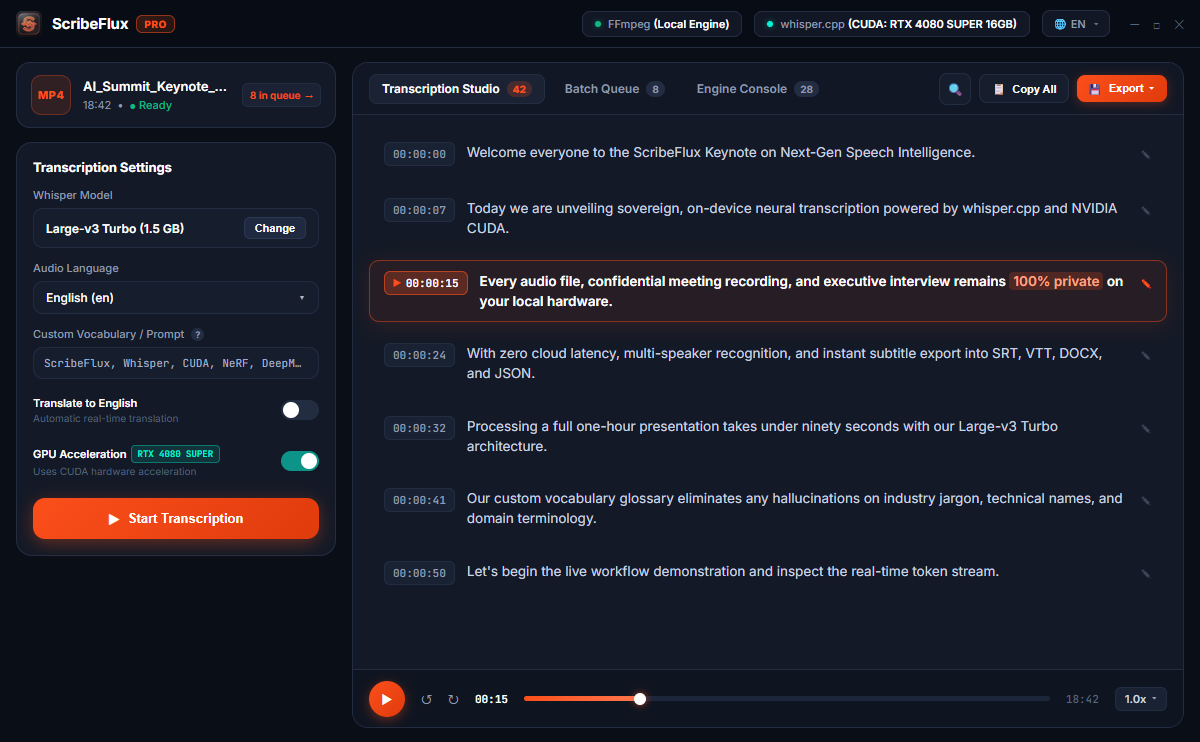
🔒 100% Offline & Sovereign ⚡ NVIDIA CUDA & Metal GPU 🎙️ Live Mic Recording 📋 Batch Processing Queue 📖 Custom Vocabulary & Glossary 📄 PDF & Word Reports 🎬 Karaoke Audio Player 🚀 Up to 15x Real-Time Speed
ScribeFlux PRO Desktop Interface

Why ScribeFlux PRO Makes the Difference

While Free models (Tiny, Base) are lightweight, they frequently hallucinate or loop on real speech. PRO models (Small, Medium, Large-v3) deliver broadcast-level accuracy.

Model Tier Parameter Size VRAM Required Real-World Speech Test Output Quality
Whisper Tiny 39 MB ~300 MB Missing words, weak punctuation Rough Draft
Whisper Base (Free) 142 MB ~500 MB Loops on audio pauses, 9 fragmented lines Frequent Hallucinations
Whisper Small (PRO) 465 MB ~1.0 GB 61 coherent, precise segments with punctuation ✓ 98% Accuracy (Sweet Spot)
Whisper Medium (PRO) 1.5 GB ~2.6 GB Captures technical jargon, heavy accents, dialects ✓ Professional Studio
Whisper Large-v3 Turbo (PRO) NEW 1.5 GB ~2.4 GB Near-Large accuracy at 8x speed; ideal for long podcasts & videos ✓ 8x Turbo Speed & 99% Precision
Whisper Large-v3 (PRO) 3.1 GB ~4.8 GB State-of-the-art multilingual translation & STT ✓ State of the Art

Engineered for Professionals

Engineered from the ground up for privacy, performance, and flexibility.

🛡️

100% Privacy & Sovereign Data

Your audio and transcripts never leave your hardware. No cloud servers, no account tracking, and zero risk of proprietary data leaks.

Native GPU Acceleration

Powered by whisper.cpp with high-performance NVIDIA CUDA on Windows and Apple Silicon Metal on macOS. Transcribe at 10x-15x real-time speed.

🎤

Word-Level Karaoke Timing & Interactive Player

Generate microsecond-accurate word timestamps. Review transcripts with synchronized audio playback, interactive karaoke word highlighting, inline editing, and variable speed.

📁

Universal Format Exports (.PDF, .DOCX, .SRT, .VTT)

Export publication-ready PDF documents, formatted Microsoft Word (.DOCX) reports with speaker timestamps, or synchronized subtitles for Premiere Pro, Final Cut, and DaVinci Resolve (.SRT, .VTT, .TXT, .JSON, .CSV, .MD).

🎙️

Direct Microphone Recording & Dictation

Record interviews, lectures, meetings, and voice memos directly inside ScribeFlux with live soundwave visualization. Audio is saved as uncompressed 16kHz WAV locally and auto-transcribed in one click.

🌍

99+ Languages & Translation

Automatic language identification across 99+ languages. One-click translate-to-English for foreign interviews, podcasts, and calls.

🎞️

30+ Video & Audio Formats

Drag and drop MP4, MKV, MOV, MP3, WAV, M4A, FLAC, AAC, WMV, WebM, and more. Integrated ffmpeg engine extracts and resamples audio automatically.

📋

Batch Queue & Folder Ingestion

Queue dozens of files or drop entire folders. Sequential pipeline processes files continuously with 100% GPU efficiency without memory exhaustion.

📖

Custom Vocabulary & Glossary

Inject brand names, technical jargon, medical terms, and acronyms using Whisper's prompt guidance (--prompt) for pinpoint recognition accuracy.

Unlock ScribeFlux PRO

Choose the plan that fits your workflow. 30-day money-back guarantee on all licenses.

Monthly Pass
Ideal for short transcription projects, podcasts, or temporary workloads.
$ 3.99 / month
  • All PRO Models (Small, Medium, Large, Turbo)
  • Unlimited Batch Processing Queue
  • Full GPU Hardware Acceleration
  • Karaoke Word Timing & Sync Playback
  • All Formats (.PDF, .DOCX, .SRT, .VTT, .JSON)
  • Direct Microphone Audio Recording
  • Cancel anytime with 1 click
Lifetime PRO
Pay once, keep forever. No subscriptions or recurring bills ever.
$ 29.99 one-time
  • Perpetual ScribeFlux PRO License
  • Unlimited Batch Queue & Folders
  • All Models (including Large-v3 Turbo)
  • Custom Vocabulary Prompting
  • PDF & DOCX Reports, SRT, VTT, JSON
  • Direct Microphone Recording & Dictation
  • 100% Offline Cryptographic Key
  • Free Lifetime Updates
  • Activate on up to 3 devices
🛡️
30-Day Money-Back Guarantee: Try ScribeFlux PRO risk-free. If you're not completely thrilled with the accuracy and speed, we'll refund your purchase in full.

Download ScribeFlux Free

Start transcribing with our free models right away. Upgrade to PRO whenever you need higher accuracy.

Download for Windows
Windows 10/11 • 64-bit (.exe) • v1.0.4
Download for macOS
Apple Silicon & Intel (.dmg) • v1.0.4
🔒 100% Virus-Free & Safe ⚡ Zero Cloud Latency 🍏 Apple Metal GPU Accelerated

Frequently Asked Questions

Does ScribeFlux upload my audio to any servers?
No, absolutely never. ScribeFlux executes speech-to-text inference entirely on your local CPU or GPU using whisper.cpp. Your audio, video, and generated transcripts stay 100% on your machine. Our licensing system is also 100% cryptographic and offline (HMAC-SHA256) with zero DRM phone-home tracking, allowing you to transcribe on completely air-gapped workstations or while traveling offline.
What hardware do I need to run ScribeFlux?
ScribeFlux runs smoothly on any standard modern PC (Intel/AMD x64) or Mac (Apple Silicon & Intel). If you have an NVIDIA GPU (RTX series or GTX 1060+ with 4GB+ VRAM), ScribeFlux automatically leverages CUDA hardware acceleration for up to 15x real-time transcription. On macOS, Apple Silicon Metal GPU acceleration is enabled automatically.
What is the difference between Free and PRO?
The Free version includes Whisper Tiny and Base models with a 3-file batch queue limit. PRO unlocks broadcast-level accuracy models: Small (465MB), Medium (1.5GB), Large-v3 (3.1GB), and the lightning-fast Large-v3 Turbo (1.5GB). PRO also grants Unlimited Batch Processing Queue, entire folder ingestion, Custom Vocabulary & Glossary prompting, publication-ready PDF and Microsoft Word (.DOCX) report exports, direct microphone audio recording, and word-level karaoke synchronization.
How do I activate my license key?
After purchasing through Paddle, you will receive a license key (e.g., SCRIBE-PRO-XXXX-YYYY) by email. Click the "💎 Get PRO" button in the top bar of ScribeFlux, paste your key, and click "Activate". Your license is verified cryptographically on your device instantly without requiring internet access or account registration.
Can I use my license on more than one computer?
Yes! A single ScribeFlux PRO license allows personal activation on up to 3 devices (e.g. desktop workstation and laptop).
What is your refund policy?
We offer an unconditional 30-day money-back guarantee on all ScribeFlux purchases. If you're not satisfied for any reason, email us at support@scribefluxapp.com for an immediate full refund.